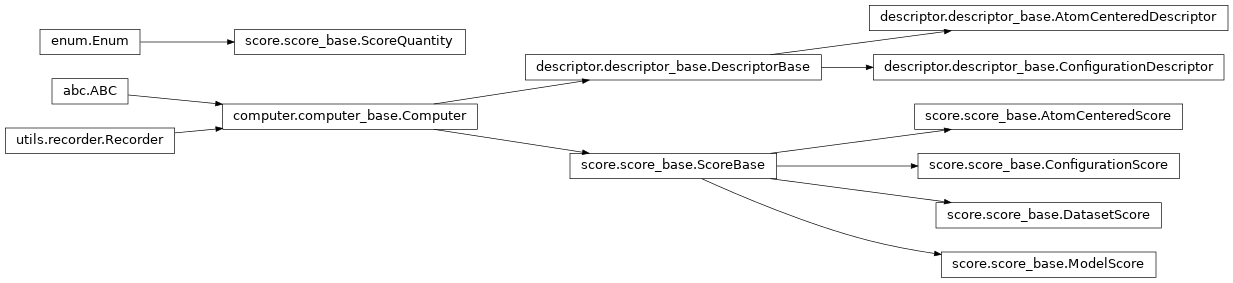
Computer
The Computer class provides an API and some basic functionality for the execution of generic calculations. Similar to the Recorder class, the Computer is meant to be inherited by other base classes in order to ensure that they obey the expected API and to avoid duplicating some boilerplate code. Due to the generic nature of Computer, different sub-classes may have significantly different implementations of the core functions.
In general, any sub-class of Computer is expected to support at least one of four possible execution modes:
- in-memory, single input: the
compute()method is meant to be calledin-memory (e.g. from an interactive terminal, or within a script) for computing the value of interest for a single input.
- in-memory, multiple input: by implementing
compute_batch(), a sub-class mayadditionally support batched evaluation.
- workflow, single input: if
compute()is already implemented, thenimplementing
get_run_command()will allow for execution ofcompute()across a (possibly distributed) workflow .
- workflow, multiple input:
get_batched_run_command()may be a modifiedversion of
get_run_command()which leveragescompute_batch()for batched workflow execution.
See the full API for the module at Computer Module.
ColabFit Integration
In order for a value computed by a Computer to be stored in a ColabFit database, it is necessary to first define a “property definition” and a “property map”. These should be supported by implementing get_colabfit_property_definition and get_colabfit_property_map.
A property definition specifies all of the fields that are necessary to uniquely define an instance of a computed property. For example, when storing an atomic environment descriptor, you may need to specify the radial cutoff distance that was used when calculating the descriptor in order to distinguish it from other descriptors computed with different cutoffs.
The property definitions used by ColabFit follow the format described at https://openkim.org/doc/schema/properties-framework/. As a simple example, one might use the following property definition for an atomic environment descriptor:
{
   "property-name": 'atomic-environment-descriptor',

   "property-title": "My Custom Atomic Environment Descriptor",

   "property-description": "A simple example descriptor",

   "descriptors": {
      "type": "float",  # "string", "float", "int", "bool", or "file"
      "has-unit": False,
      "extent": [":", ":"],  # a 2D array with unspecified lengths
      "required": True,
      "description": "The per-atom descriptors.",
   },
   "cutoff-distance": {  # NOTE: only lowercase alphanumeric and dashes
      "type": "float",
      "has-unit": True,  # some values may have units
      "extent": [],  # a scalar value
      "required": True,
      "description": "The cutoff distance",
}
A property map is used by ColabFit to specify where on an ASE.Atoms object the property values are stored. ColabFit will use the “field” values to search for the computed values in the .info and .arrays dictionaries. For example:
{
   'descriptors': {
         'field': "descriptors",  # a per-atom value stored in .arrays
         'units': None
   },
   'cutuff-distance': {
         'field': 'cutoff-distance'  # a scalar value stored in .info
         'units': 'Ang'  # to specify the units of the value
   }
}
Inheritance Graph