Workflow
This module handles the submission and retrieval of simulations to either a local computer or HPC resources, managing the file structure of the simulations, and retains information on the location of job files.
To see a list of currently implemented job schedulers, see the full API for the
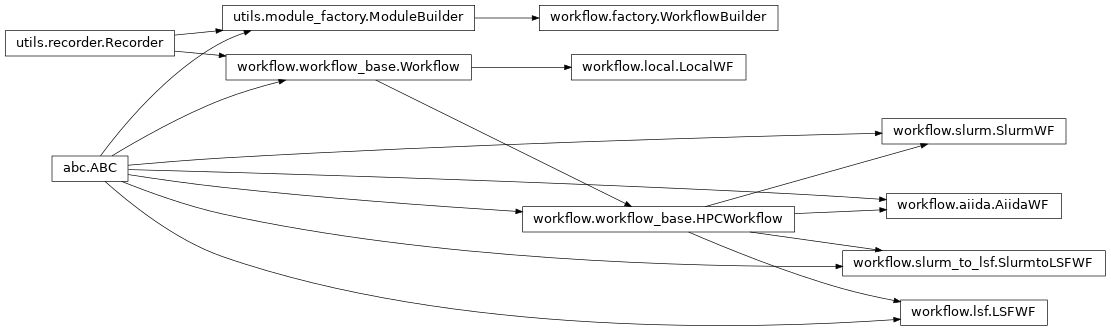
module at Workflow Module. The abstract base class
Workflow provides the standard
interface for all of the concrete implementations. We also provide an abstract
base class for HPC schedulers:
HPCWorkflow
The simplest implementation provides an interface with the local command line, but interface with job schedulers or other more sophisticated tools, such as Merlin is also possible.
Use Cases
LocalWF
Implementation for running jobs locally on a personal computer or an interactive job session
LocalWF. Note that
all of the modules define a default workflow which is used if a workflow is
needed but not supplied. This default is an instance of
LocalWF with the root directory set to
the module’s name.
SlurmWF
A default script template for the slurm batch file is provided, but the user
can define their own and provide it’s path via the default_template
keyword in the workflow_args dictionary passed to the Workflow constructor.
Also note that if synchronous (blocking) behavior is desired, this can be
toggled with the synchronous keyword in the job_details dict provided
to submit_job().
The job_details dict also hosts any modifications to the batch job desired,
with the default batch template defining all possible options:
#!/bin/bash
#SBATCH -N <NODES>
#SBATCH -p <QUEUE>
#SBATCH -A <ACCOUNT>
#SBATCH -t <WALLTIME>
<EXTRA_HEADER>

<PREAMBLE>

<COMMAND>

<POSTAMBLE>
In addition to these keywords (which should be set as lowercase, i.e.
‘preamble’), default queue, account, walltime, and node parameters can be set.
Lastly, the frequency of calls to squeue are set by wait_freq, which has a
default of 60 seconds.
The workflow is designed to have flexibility for heterogenous use cases.
To this end, default parameters can be set by the user when constructing the
Workflow via the workflow_args dict, but many of these parameters can be
overridden for any specific job by providing them in the job_details dict
of the submit_job()
function.
When using an asynchronous workflow, it is important to use a blocking function
to ensure necessary calculations are done before proceding. An example is
SlurmWF’s
block_until_completed() method,
which would be called right before the outcomes of any set of calculations
are needed by subsequent functions or modules.
LSFWF
LSFWF is provided as a mirror to
SlurmWF that enables the use of
IBM’s LSF scheduler. Much of the previous description applies to this
scheduler as well. The differences will be highlighted below.
SlurmtoLSFWF
Moreover, SlurmtoLSFWF is
provided as a mirror to LSFWF that
enables submitting jobs on a LSF machine while running Orchestrator on a
Slurm machine. To use this functionality, the preamble needs to be set in the
job_details dict to do the necessary exports and sourcing for kim_api on
a LSF machine (see setup_tests.zsh for the details), so that LAMMPS can be
used on the LSF machine without activating Orchestrator.
AiidaWF
An interface for the AiiDA framework has been implemented as a Workflow for
the Orchestrator. This must be combined with any of the oracles found in
AiiDA API documentation. As
AiidaWF inherits from
HPCWorkflow, all of the variables
related to job submission are the same. These values can be seen at the
HPCWorkflow API documentation.
Slurm and LSF Differences
While Slurm and LSF perform the same function, there are subtle differences in keyword selection and use cases. The LLNL LC reference pages for Slurm and LSF are good places to start for details on these schedulers. Differences in flags used for specifying the jobs can also be found in the chart here.
Full documentation for Slurm sbatch and LSF bsub can be found at the provided links.
Development Plan
As use cases for the Orchestrator are fleshed out, more complex workflows can be developed. These may interface with tools such as Maestro and/or Merlin, or other software entirely.
Inheritance Graph