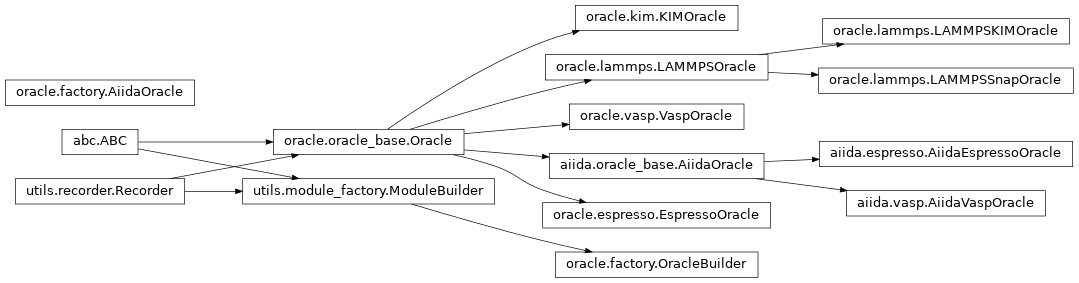
Oracle
The primary purpose of the Oracle module is to execute and post-process “ground truth” calculations. These calculations can be used to create or supplement a IAP training set, or provide a reference to a given configuration. The module provides interfaces to use a number of simulation tools, including LAMMPS, Quantum Espresso, and VASP. In addition, there is an interface to use AiiDA for automated calculations with error handling and provenance tracking.
The abstract base class Oracle
provides the standard interface for all of the concrete implementations.
See the full API for the module at Oracle Module.
Example Scripts
The Oracle module can be called by other Orchestrator modules, or as a standalone class. A few examples are given below to show how the user could possibly interact with the module. The unit tests introduced in Testing also provide a useful example of how the Oracle module can be deployed.
All of the input parameters can be set within the same python script and passed
to the respective functions. To increase readability, many of the code input
parameters may be saved to a separate json file. Utility functions found in
setup_input can be used to pull the appropriate
sections. Three different examples using VaspOracle, EspressoOracle, and
AiidaEspressoOracle are provided below.
VaspOracle JSON example
{
   "oracle":{
      "oracle_type":"VASP",
      "oracle_args":{
         "code_path":"<VASP_PATH>"
      },
      "extra_input_args":{
         "incar": {
            "ENCUT": 250,
            "PREC": "ACCURATE",
            "EDIFF": 1E-4,
            "LORBIT": 11,
            "ISMEAR": 0,
            "SIGMA": 0.1,
            "GGA": "PS",
            "KPAR": 1,
            "NCORE": 1,
            "NELM": 500
         },
      },
      "job_details":{
         "synchronous":false,
         "walltime":5
      }
   },
   "workflow":{
      "workflow_type":"<ASYNCH_WORKFLOW>",
      "workflow_args":{
         "root_directory":"./oracle",
         "queue":"<HPC_QUEUE>",
         "account":"<HPC_ACCOUNT>",
         "nodes":"<NUM_NODES>",
         "tasks":"<NUM_TASKS>",
         "wait_freq":60
      }
   },
   "storage":{
      "storage_type":"COLABFIT",
      "storage_args":{
         "credential_file":"<STORAGE_CREDENTIAL_PATH>"
      }
   }
}
EspressoOracle JSON example
{
   "oracle":{
      "oracle_type":"QE",
      "oracle_args":{
         "code_path":"<QE_PATH>"
      },
      "job_details":{
         "synchronous":false,
         "walltime":5,
         "extra_args":{
            "preamble":"echo 'hello world'",
            "after":"echo 'done'"
         }
      }
   },
   "workflow":{
      "workflow_type":"<ASYNCH_WORKFLOW>",
      "workflow_args":{
         "root_directory":"./oracle",
         "queue":"<HPC_QUEUE>",
         "account":"<HPC_ACCOUNT>",
         "nodes":"<NUM_NODES>",
         "tasks":"<NUM_TASKS>",
         "wait_freq":60
      }
   },
   "storage":{
      "storage_type":"COLABFIT",
      "storage_args":{
         "credential_file":"<STORAGE_CREDENTIAL_PATH>"
      }
   }
}
AiidaEspressoOracle JSON example
{
   "oracle": {
      "oracle_type": "AiiDA-QE",
      "oracle_args": {
         "workchain": "quantumespresso.pw.relax",
         "code_str": "pw@localhost"
      },
      "extra_input_args": {
         "parameters": "parameters.json",
         "potential_family": "SSSP/1.3/PBE/precision",
         "kspacing": 0.25
      },
   },
   "storage": {
      "storage_type": "LOCAL",
      "storage_args": {
         "database_path": "/path/to/local/storage"
      }
   },
   "workflow":{
      "workflow_type": "AiiDA",
      "workflow_args": {
         "root_directory": "./oracle",
         "tasks": 1
      }
   }
}
The values available for the Workflow module can be seen in the
documentation for Workflow or
HPCWorkflow where the latter
would likely be the normal use case.
You will notice in the input files that the input parameters for the simulation can be written to an external json file as well. These values can be used for general settings and if multiple oracle simulations are ran, can be modified and passed to each individual simulation. An example for Quantum Espresso is shown below.
Quantum Espresso parameters.json example
{
   "CONTROL": {
      "calculation": "scf",
      "forc_conv_thr": 0.001,
      "tprnfor": true,
      "tstress": true,
      "etot_conv_thr": 0.0001
   },
   "SYSTEM": {
      "nosym": false,
      "occupations": "smearing",
      "smearing": "mv",
      "degauss": 0.01,
      "ecutwfc": 90.0,
      "ecutrho": 1080.0
   },
   "ELECTRONS": {
      "electron_maxstep": 80,
      "mixing_beta": 0.4,
      "conv_thr": 4e-10
   }
}
A simple python script can then be used to import the values and submit the simulation to the oracle.
Oracle simulation
import json
import os
from ase.io import read
from orchestrator.utils.setup_input import init_and_validate_module_type
from orchestrator.utils.input_output import safe_write

# Load all the inputs or define them in a dictionary.
with open(input_file, 'r') as fin:
   all_inputs = json.load(fin)

# Initialize each module for later use.
oracle_inputs = all_inputs.get('oracle', all_inputs)
oracle = init_and_validate_module_type('oracle', oracle_inputs, True)
workflow = init_and_validate_module_type('workflow', all_inputs)
if workflow is None:
   workflow = oracle.default_wf
storage = init_and_validate_module_type('storage', all_inputs)

# Read in the configurations for simulations.
configs = []
for root, _, files in os.walk(oracle_inputs.get('data_path'),
                              followlinks=True):
   for i, f in enumerate(files):
      configs.append(read(f'{root}/{f}'))

if storage is not None:
   storage.set_default_property_map()
   configs = storage.sort_configurations(configs)

# Initiate the individual oracle runs.
calc_ids = oracle.run(
   oracle_inputs.get('path_type'),
   oracle_inputs.get('extra_input_args'),
   configs,
   workflow=workflow,
   job_details=oracle_inputs.get('job_details', {}),
)

# Have orchestrator wait for the jobs.
workflow.block_until_completed(calc_ids)

# Save information from the simulations.
new_handle = oracle.save_labeled_configs(
   calc_ids,
   storage=storage,
   dataset_name='run_01',
   workflow=workflow,
)
print(f'Labeled configurations saved to {new_handle}')
saved_data = storage.get_data(new_handle)
for config, calc_id in zip(saved_data, calc_ids):
   save_path = workflow.get_job_path(calc_id)
   if save_path is None:
      save_path = workflow.make_path(oracle.__class__.__name__,
                                     f'{oracle_inputs.get('path_type')}_{calc_id}')
   safe_write(f'{save_path}/saved_config.extxyz', config)

return True
In the case that a user would like to upload calculations executed externally to the orchestrator, a brief explanation is provided at Uploading External Calculations.
Inheritance Graph